
The Altair Community is migrating to a new platform to provide a better experience for you. In preparation for the migration, the Altair Community is on read-only mode from October 28 - November 6, 2024. Technical support via cases will continue to work as is. For any urgent requests from Students/Faculty members, please submit the form linked here
Parallel processing inside of a loop operator?

 Guru
Guru
I have never seen this before, but there seems to be parallel processing inside of a loop examples operator. I know that in some operators one is able to select parallel execution, but I was always of the opinion it was not possible in Loop Example?
Tagged:
0
Best Answer
-
 David_A
Administrator, Moderator, Employee-RapidMiner, RMResearcher, Member Posts: 297
David_A
Administrator, Moderator, Employee-RapidMiner, RMResearcher, Member Posts: 297  RM Research
Hi,the Loop Examples operator itself does not execute in parallel. But of course if you run any parallelized Operator inside the loop, it can be executed in parallel.Is there a specific reason for your question?Best,
RM Research
Hi,the Loop Examples operator itself does not execute in parallel. But of course if you run any parallelized Operator inside the loop, it can be executed in parallel.Is there a specific reason for your question?Best,
David6

Answers
Thanks.
Scott
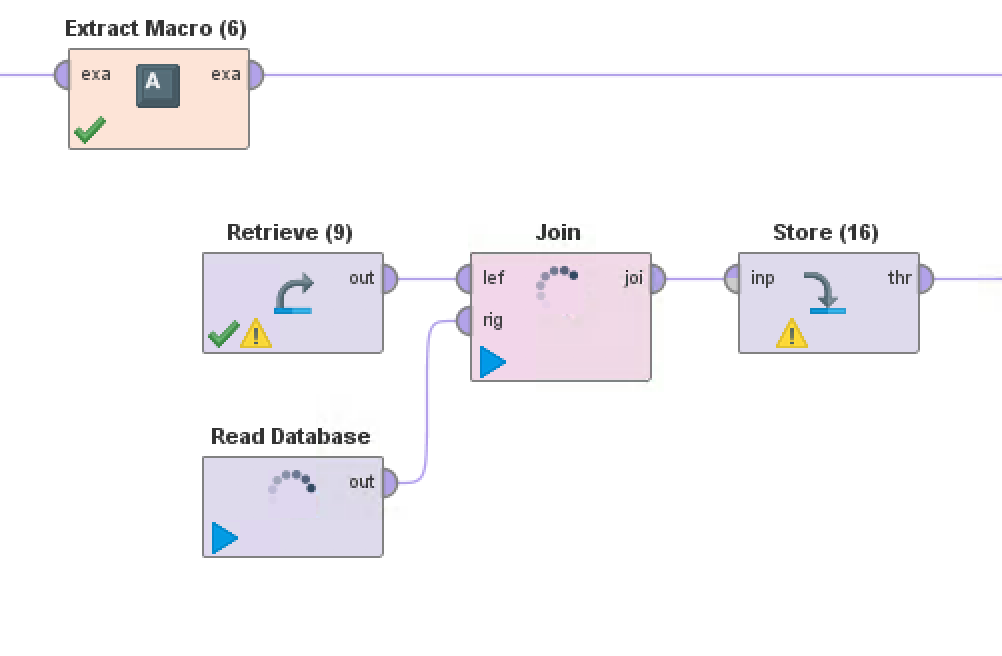
<?xml version="1.0" encoding="UTF-8"?><process version="8.2.000"> <context> <input/> <output/> <macros/> </context> <operator activated="true" class="process" compatibility="8.2.000" expanded="true" name="Process"> <process expanded="true"> <operator activated="true" class="generate_data_user_specification" compatibility="8.2.000" expanded="true" height="68" name="Generate Data by User Specification (5)" width="90" x="45" y="238"> <list key="attribute_values"> <parameter key="1" value="("1")"/> <parameter key="2" value="("2")"/> <parameter key="3" value="("3")"/> <parameter key="4" value="("4")"/> <parameter key="5" value="("5")"/> <parameter key="6" value="("6")"/> <parameter key="7" value="("7")"/> <parameter key="8" value="("8")"/> <parameter key="9" value="("9")"/> <parameter key="a" value="("a")"/> <parameter key="b" value="("b")"/> <parameter key="c" value="("c")"/> <parameter key="d" value="("d")"/> <parameter key="e" value="("e")"/> <parameter key="f" value="("f")"/> </list> <list key="set_additional_roles"/> <description align="center" color="transparent" colored="false" width="126">Generate the prefixes that will be used in the loop operator</description> </operator> <operator activated="true" class="transpose" compatibility="8.2.000" expanded="true" height="82" name="Transpose (5)" width="90" x="179" y="238"/> <operator activated="true" class="loop_examples" compatibility="8.2.000" expanded="true" height="82" name="Loop Examples (5)" width="90" x="313" y="238"> <process expanded="true"> <operator activated="true" class="extract_macro" compatibility="8.2.000" expanded="true" height="68" name="Extract Macro (7)" width="90" x="112" y="34"> <parameter key="macro" value="prefix"/> <parameter key="macro_type" value="data_value"/> <parameter key="attribute_name" value="att_1"/> <parameter key="example_index" value="%{example}"/> <list key="additional_macros"/> </operator> <operator activated="true" class="generate_data_user_specification" compatibility="8.2.000" expanded="true" height="68" name="Generate Data by User Specification" width="90" x="112" y="289"> <list key="attribute_values"> <parameter key="2" value=""a""/> <parameter key="2" value=""b""/> <parameter key="2" value=""c""/> </list> <list key="set_additional_roles"/> </operator> <operator activated="true" class="filter_examples" compatibility="8.2.000" expanded="true" height="103" name="Filter Examples" width="90" x="246" y="289"> <list key="filters_list"> <parameter key="filters_entry_key" value="2.does_not_contain.%{prefix}"/> </list> <parameter key="filters_logic_and" value="false"/> </operator> <operator activated="true" class="generate_data_user_specification" compatibility="8.2.000" expanded="true" height="68" name="Generate Data by User Specification (2)" width="90" x="112" y="136"> <list key="attribute_values"> <parameter key="1" value=""a""/> <parameter key="1" value=""b""/> <parameter key="1" value=""c""/> <parameter key="1" value=""d""/> <parameter key="1" value=""e""/> </list> <list key="set_additional_roles"/> </operator> <operator activated="true" class="filter_examples" compatibility="8.2.000" expanded="true" height="103" name="Filter Examples (2)" width="90" x="246" y="136"> <list key="filters_list"> <parameter key="filters_entry_key" value="1.does_not_contain.%{prefix}"/> </list> <parameter key="filters_logic_and" value="false"/> </operator> <operator activated="true" class="concurrency:join" compatibility="8.2.000" expanded="true" height="82" name="Join (31)" width="90" x="447" y="136"> <parameter key="join_type" value="outer"/> <parameter key="use_id_attribute_as_key" value="false"/> <list key="key_attributes"> <parameter key="1" value="2"/> </list> <parameter key="keep_both_join_attributes" value="true"/> </operator> <operator activated="true" class="generate_data_user_specification" compatibility="8.2.000" expanded="true" height="68" name="Generate Data by User Specification (3)" width="90" x="112" y="748"> <list key="attribute_values"> <parameter key="1" value=""e""/> <parameter key="1" value=""f""/> <parameter key="1" value=""g""/> </list> <list key="set_additional_roles"/> </operator> <operator activated="true" class="filter_examples" compatibility="8.2.000" expanded="true" height="103" name="Filter Examples (3)" width="90" x="246" y="748"> <list key="filters_list"> <parameter key="filters_entry_key" value="1.does_not_contain.%{prefix}"/> </list> <parameter key="filters_logic_and" value="false"/> </operator> <operator activated="true" class="remember" compatibility="8.2.000" expanded="true" height="68" name="Remember" width="90" x="581" y="136"> <parameter key="name" value="data"/> </operator> <operator activated="true" class="free_memory" compatibility="8.2.000" expanded="true" height="82" name="Free Memory (32)" width="90" x="715" y="136"/> <operator activated="true" class="recall" compatibility="8.2.000" expanded="true" height="68" name="Recall" width="90" x="112" y="595"> <parameter key="name" value="data"/> </operator> <operator activated="true" class="filter_examples" compatibility="8.2.000" expanded="true" height="103" name="Filter Examples (4)" width="90" x="246" y="595"> <list key="filters_list"> <parameter key="filters_entry_key" value="1.does_not_contain.%{prefix}"/> </list> <parameter key="filters_logic_and" value="false"/> </operator> <operator activated="true" class="concurrency:join" compatibility="8.2.000" expanded="true" height="82" name="Join (2)" width="90" x="447" y="595"> <parameter key="join_type" value="left"/> <parameter key="use_id_attribute_as_key" value="false"/> <list key="key_attributes"> <parameter key="1" value="1"/> </list> </operator> <operator activated="true" class="store" compatibility="8.2.000" expanded="true" height="68" name="Store (2)" width="90" x="581" y="595"> <parameter key="repository_entry" value="//Local Repository/data/AOL/AOL database full cvm"/> </operator> <operator activated="true" class="free_memory" compatibility="8.2.000" expanded="true" height="82" name="Free Memory (2)" width="90" x="715" y="595"/> <connect from_port="example set" to_op="Extract Macro (7)" to_port="example set"/> <connect from_op="Generate Data by User Specification" from_port="output" to_op="Filter Examples" to_port="example set input"/> <connect from_op="Filter Examples" from_port="example set output" to_op="Join (31)" to_port="right"/> <connect from_op="Generate Data by User Specification (2)" from_port="output" to_op="Filter Examples (2)" to_port="example set input"/> <connect from_op="Filter Examples (2)" from_port="example set output" to_op="Join (31)" to_port="left"/> <connect from_op="Join (31)" from_port="join" to_op="Remember" to_port="store"/> <connect from_op="Generate Data by User Specification (3)" from_port="output" to_op="Filter Examples (3)" to_port="example set input"/> <connect from_op="Filter Examples (3)" from_port="example set output" to_op="Join (2)" to_port="right"/> <connect from_op="Remember" from_port="stored" to_op="Free Memory (32)" to_port="through 1"/> <connect from_op="Recall" from_port="result" to_op="Filter Examples (4)" to_port="example set input"/> <connect from_op="Filter Examples (4)" from_port="example set output" to_op="Join (2)" to_port="left"/> <connect from_op="Join (2)" from_port="join" to_op="Store (2)" to_port="input"/> <connect from_op="Store (2)" from_port="through" to_op="Free Memory (2)" to_port="through 1"/> <connect from_op="Free Memory (2)" from_port="through 1" to_port="example set"/> <portSpacing port="source_example set" spacing="0"/> <portSpacing port="sink_example set" spacing="0"/> <portSpacing port="sink_output 1" spacing="0"/> </process> <description align="center" color="transparent" colored="false" width="126"/> </operator> <connect from_op="Generate Data by User Specification (5)" from_port="output" to_op="Transpose (5)" to_port="example set input"/> <connect from_op="Transpose (5)" from_port="example set output" to_op="Loop Examples (5)" to_port="example set"/> <connect from_op="Loop Examples (5)" from_port="example set" to_port="result 1"/> <portSpacing port="source_input 1" spacing="0"/> <portSpacing port="sink_result 1" spacing="0"/> <portSpacing port="sink_result 2" spacing="0"/> </process> </operator> </process>It's pretty sneaky - the 'exa' port will RESEND the data back to the input 'exa' port of Loop Examples for each iteration; the 'out' port will not. So after your first iteration the way you had it, the data coming into Extract Macro (7) was the data that went out of Join (2) after the previous iteration.
Clear as mud? That's not a bug - that's just the way Loop Examples works.
Scott
[EDIT FWIW the help panel does try to explain this...]
One important thing to note about this operator is the behavior of the example setoutput port of its subprocess. The subprocess is given the ExampleSet provided at the outer example setinput port in the first iteration. If the example setoutput port of the subprocess is connected the ExampleSet delivered here in the last iteration will be used as input for the following iteration. If it is not connected the original ExampleSet will be delivered in all iterations.anw
Cause, I did not pick up anywhere that this is how the operator works. So yip, pretty muddy.
Scott
One important note on the behaviour of the example set output port for Loop Examples, the first iteration of Loop Examples uses the ExampleSet provided at the outer example set input port, for the next iteration if the output from the process is connected to the example set output port and not to the output port then the ExampleSet delivered to the example set port will be used for this iteration. Connecting the output to the output port means the process will then use the input port ExampleSet in the next iteration. If the output is not connected to either of the ports then the input port ExampleSet will be delivered in all iterations.
https://docs.rapidminer.com/latest/studio/operators/utility/process_control/loops/loop_examples.html
Can you provide the list of parallelized Operator?
Can we run spark in parallel mode in standard Loop Values?
I have tried using standard “Loop Values” with enable parallel execution by Inside the loop values operator, using Radoop nest with SparkRM as shown below
I ran this workflow on AI hub server, but I got error. If I use the same flow without enable parallel execution on Loop values operator. The flow works smoothly without error but it is quite slow.
Any suggestion?
Dortmund, Germany