
The Altair Community is migrating to a new platform to provide a better experience for you. In preparation for the migration, the Altair Community is on read-only mode from October 28 - November 6, 2024. Technical support via cases will continue to work as is. For any urgent requests from Students/Faculty members, please submit the form linked <a href="https://web.altair.com/community-migration-contact-us">here</a>
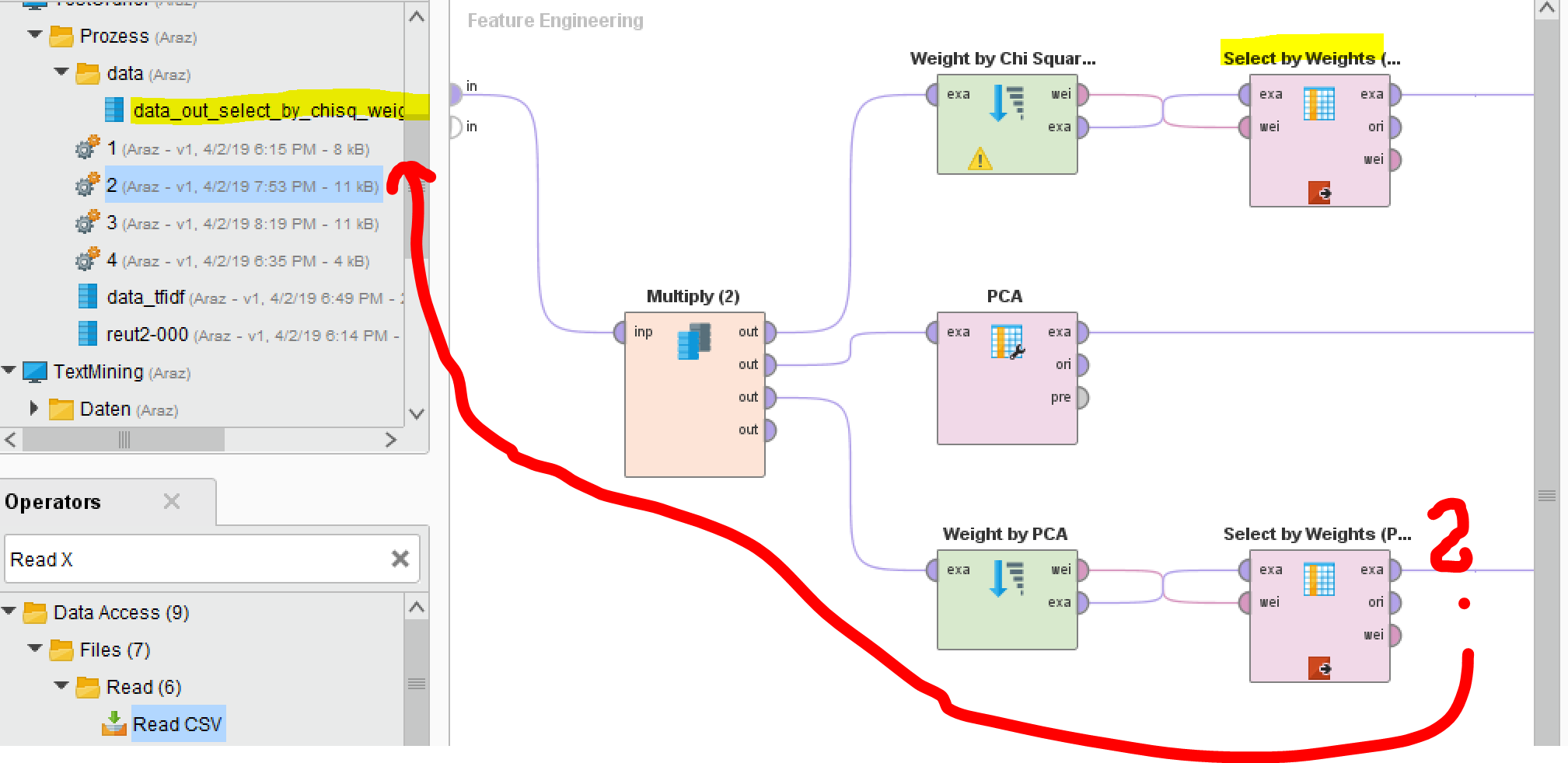
Data out selected by PCA

 Contributor II
Hello,
I have configured the process here with the calculation via TF IDF. If I start the process, would the process actually give me the output as the Data_out_selected_by_pca or?
I visualized the whole thing again briefly (see screen)
BR,
Flixport
0
Best Answers
-
 varunm1
Member Posts: 1,207
varunm1
Member Posts: 1,207  Unicorn
Hello @Flixport
Unicorn
Hello @Flixport
Did you drag and drop that data file in "inp"? if so, it will use that as input to your process.
You can see that in the XML code. The code will show you the location in the repository where it is accessing data from.Regards,
Varun
https://www.varunmandalapu.com/Be Safe. Follow precautions and Maintain Social Distancing
5 -
varunm1
Member Posts: 1,207 Unicorn
Sorry, I am a bit confused. Can you post your XML code here?Regards,
Varun
https://www.varunmandalapu.com/Be Safe. Follow precautions and Maintain Social Distancing
5 -
varunm1
Member Posts: 1,207 Unicorn
I check your process and found the data set your trying to apply does not have numerical attributes. This is the reason it is throwing an error "zero columns found for correlation matrix". PCA operator works only on numerical attributes which is the reason it is throwing this error. There are no numerical attributes in your dataset.

@kayman or @yyhuang or @lionelderkrikor might help you with your question quoted below.I wanted to extract the most important words from the datasets, is there a different approach?Sorry, I am not an expert in text miningRegards,
Varun
https://www.varunmandalapu.com/Be Safe. Follow precautions and Maintain Social Distancing
5 -
 lionelderkrikor
RapidMiner Certified Analyst, Member Posts: 1,195 Unicorn
Hi all,
lionelderkrikor
RapidMiner Certified Analyst, Member Posts: 1,195 Unicorn
Hi all,
There is a sample process which select the "most important words" in the "Community Samples" :
Hope this helps,
Regards,
Lionel5 -
 yyhuang
Administrator, Employee-RapidMiner, RapidMiner Certified Analyst, RapidMiner Certified Expert, Member Posts: 364
yyhuang
Administrator, Employee-RapidMiner, RapidMiner Certified Analyst, RapidMiner Certified Expert, Member Posts: 364  RM Data Scientist
No, you will not have nominal attributes after vectorization.
RM Data Scientist
No, you will not have nominal attributes after vectorization.
Can you take a look at the process above? My feature engineering subprocess works fine for PCA
6 -
 MartinLiebig
Administrator, Moderator, Employee-RapidMiner, RapidMiner Certified Analyst, RapidMiner Certified Expert, University Professor Posts: 3,533 RM Data Scientist
Hi @Flixport ,by definition PCA can only work on numericals. That's just part of the algorithm. If you need to use PCA then you need to find a way to convert the strings into numericals, i.e via TF-IDF or Nominal to Numerical.Best,Martin- Sr. Director Data Solutions, Altair RapidMiner -
MartinLiebig
Administrator, Moderator, Employee-RapidMiner, RapidMiner Certified Analyst, RapidMiner Certified Expert, University Professor Posts: 3,533 RM Data Scientist
Hi @Flixport ,by definition PCA can only work on numericals. That's just part of the algorithm. If you need to use PCA then you need to find a way to convert the strings into numericals, i.e via TF-IDF or Nominal to Numerical.Best,Martin- Sr. Director Data Solutions, Altair RapidMiner -
Dortmund, Germany5

Answers
No, I did not insert anything via drag & drop. Is that necessary? I ask because I did not insert anything at Chi Square. Of course, my input data is already ready as a CSV file, the attribute values are also numeric, so I can not understand that unfortunately
BR
I suggest you add an operator for text vectorization. Otherwise the text data is not vectorized into TF-IDF vectors.
I used the Reuters data reut2-000, and added vectorization before feature selections. After text vecterization, we have almost 1000 attributes for the keywords, with weight by PCA and feature selection, we kept 50 attributes.
I have sample process for text classification using 20k+ Reuters news, PM me if you need.
Here is the process fixed for feature selection. Enjoy!
<?xml version="1.0" encoding="UTF-8"?><process version="9.2.001"> <context> <input/> <output/> <macros/> </context> <operator activated="true" class="process" compatibility="9.2.001" expanded="true" name="Process"> <parameter key="logverbosity" value="init"/> <parameter key="random_seed" value="2001"/> <parameter key="send_mail" value="never"/> <parameter key="notification_email" value=""/> <parameter key="process_duration_for_mail" value="30"/> <parameter key="encoding" value="UTF-8"/> <process expanded="true"> <operator activated="true" class="retrieve" compatibility="9.2.001" expanded="true" height="68" name="Retrieve reut2-000" width="90" x="45" y="85"> <parameter key="repository_entry" value="//demo/TextMining/Reuters/reut2-000"/> </operator> <operator activated="true" class="select_attributes" compatibility="9.2.001" expanded="true" height="82" name="Select Attributes" width="90" x="179" y="85"> <parameter key="attribute_filter_type" value="subset"/> <parameter key="attribute" value=""/> <parameter key="attributes" value="|places|text"/> <parameter key="use_except_expression" value="false"/> <parameter key="value_type" value="attribute_value"/> <parameter key="use_value_type_exception" value="false"/> <parameter key="except_value_type" value="time"/> <parameter key="block_type" value="attribute_block"/> <parameter key="use_block_type_exception" value="false"/> <parameter key="except_block_type" value="value_matrix_row_start"/> <parameter key="invert_selection" value="false"/> <parameter key="include_special_attributes" value="true"/> </operator> <operator activated="true" class="generate_id" compatibility="9.2.001" expanded="true" height="82" name="Generate ID" width="90" x="313" y="85"> <parameter key="create_nominal_ids" value="false"/> <parameter key="offset" value="0"/> </operator> <operator activated="true" breakpoints="after" class="filter_examples" compatibility="9.2.001" expanded="true" height="103" name="Filter Examples" width="90" x="447" y="85"> <parameter key="parameter_expression" value=""/> <parameter key="condition_class" value="custom_filters"/> <parameter key="invert_filter" value="false"/> <list key="filters_list"> <parameter key="filters_entry_key" value="places.does_not_equal.?"/> </list> <parameter key="filters_logic_and" value="true"/> <parameter key="filters_check_metadata" value="true"/> </operator> <operator activated="true" class="set_role" compatibility="9.2.001" expanded="true" height="82" name="Set Role" width="90" x="581" y="85"> <parameter key="attribute_name" value="places"/> <parameter key="target_role" value="label"/> <list key="set_additional_roles"/> </operator> <operator activated="true" class="model_simulator:text_vectorization" compatibility="9.2.001" expanded="true" height="103" name="Text Vectorization" width="90" x="715" y="85"> <parameter key="attribute_filter_type" value="single"/> <parameter key="attribute" value="text"/> <parameter key="attributes" value=""/> <parameter key="use_except_expression" value="false"/> <parameter key="value_type" value="nominal"/> <parameter key="use_value_type_exception" value="false"/> <parameter key="except_value_type" value="file_path"/> <parameter key="block_type" value="single_value"/> <parameter key="use_block_type_exception" value="false"/> <parameter key="except_block_type" value="value_matrix_row_start"/> <parameter key="invert_selection" value="false"/> <parameter key="include_special_attributes" value="false"/> <parameter key="add sentiment" value="false"/> <parameter key="add language" value="false"/> <parameter key="keep original" value="false"/> <parameter key="store training documents" value="true"/> <parameter key="store scoring documents" value="false"/> <parameter key="document class attribute" value=""/> <parameter key="token split" value="\s+"/> <parameter key="apply pruning" value="true"/> <parameter key="max number of new columns" value="1000"/> <description align="center" color="transparent" colored="false" width="126">convert text into tf-idf vectors</description> </operator> <operator activated="true" breakpoints="after" class="remove_correlated_attributes" compatibility="9.2.001" expanded="true" height="82" name="Remove Correlated Attributes" width="90" x="916" y="85"> <parameter key="correlation" value="0.8"/> <parameter key="filter_relation" value="greater"/> <parameter key="attribute_order" value="random"/> <parameter key="use_absolute_correlation" value="true"/> <parameter key="use_local_random_seed" value="false"/> <parameter key="local_random_seed" value="1992"/> </operator> <operator activated="true" class="subprocess" compatibility="9.2.001" expanded="true" height="124" name="Feature Engineering" width="90" x="1117" y="85"> <process expanded="true"> <operator activated="true" class="multiply" compatibility="9.2.001" expanded="true" height="124" name="Multiply (2)" width="90" x="112" y="187"/> <operator activated="true" class="weight_by_chi_squared_statistic" compatibility="9.2.001" expanded="true" height="82" name="Weight by Chi Squared Statistic" width="90" x="313" y="34"> <parameter key="normalize_weights" value="false"/> <parameter key="sort_weights" value="true"/> <parameter key="sort_direction" value="descending"/> <parameter key="number_of_bins" value="10"/> </operator> <operator activated="true" breakpoints="after" class="select_by_weights" compatibility="9.2.001" expanded="true" height="103" name="Select by Weights (ChiSq)" width="90" x="514" y="34"> <parameter key="weight_relation" value="top k"/> <parameter key="weight" value="10.0"/> <parameter key="k" value="50"/> <parameter key="p" value="0.1"/> <parameter key="deselect_unknown" value="true"/> <parameter key="use_absolute_weights" value="false"/> </operator> <operator activated="true" class="store" compatibility="9.2.001" expanded="true" height="68" name="Store" width="90" x="715" y="34"> <parameter key="repository_entry" value="//demo/TextMining/Reuters/tmp/DT cluster"/> </operator> <operator activated="true" class="principal_component_analysis" compatibility="9.2.001" expanded="true" height="103" name="PCA" width="90" x="313" y="187"> <parameter key="dimensionality_reduction" value="keep variance"/> <parameter key="variance_threshold" value="0.8"/> <parameter key="number_of_components" value="1"/> </operator> <operator activated="true" class="weight_by_pca" compatibility="9.2.001" expanded="true" height="82" name="Weight by PCA" width="90" x="313" y="340"> <parameter key="normalize_weights" value="false"/> <parameter key="sort_weights" value="true"/> <parameter key="sort_direction" value="ascending"/> <parameter key="component_number" value="1"/> </operator> <operator activated="true" breakpoints="after" class="select_by_weights" compatibility="9.2.001" expanded="true" height="103" name="Select by Weights (PCA)" width="90" x="514" y="340"> <parameter key="weight_relation" value="top k"/> <parameter key="weight" value="10.0"/> <parameter key="k" value="50"/> <parameter key="p" value="0.1"/> <parameter key="deselect_unknown" value="true"/> <parameter key="use_absolute_weights" value="true"/> </operator> <operator activated="true" class="store" compatibility="9.2.001" expanded="true" height="68" name="Store (3)" width="90" x="715" y="340"> <parameter key="repository_entry" value="//demo/TextMining/Reuters/tmp/data_out_select_by_pca_weights"/> </operator> <operator activated="true" class="store" compatibility="9.2.001" expanded="true" height="68" name="Store (2)" width="90" x="715" y="187"> <parameter key="repository_entry" value="//demo/TextMining/Reuters/tmp/data_out_pca"/> </operator> <connect from_port="in 1" to_op="Multiply (2)" to_port="input"/> <connect from_op="Multiply (2)" from_port="output 1" to_op="Weight by Chi Squared Statistic" to_port="example set"/> <connect from_op="Multiply (2)" from_port="output 2" to_op="PCA" to_port="example set input"/> <connect from_op="Multiply (2)" from_port="output 3" to_op="Weight by PCA" to_port="example set"/> <connect from_op="Weight by Chi Squared Statistic" from_port="weights" to_op="Select by Weights (ChiSq)" to_port="weights"/> <connect from_op="Weight by Chi Squared Statistic" from_port="example set" to_op="Select by Weights (ChiSq)" to_port="example set input"/> <connect from_op="Select by Weights (ChiSq)" from_port="example set output" to_op="Store" to_port="input"/> <connect from_op="Store" from_port="through" to_port="out 1"/> <connect from_op="PCA" from_port="example set output" to_op="Store (2)" to_port="input"/> <connect from_op="Weight by PCA" from_port="weights" to_op="Select by Weights (PCA)" to_port="weights"/> <connect from_op="Weight by PCA" from_port="example set" to_op="Select by Weights (PCA)" to_port="example set input"/> <connect from_op="Select by Weights (PCA)" from_port="example set output" to_op="Store (3)" to_port="input"/> <connect from_op="Store (3)" from_port="through" to_port="out 3"/> <connect from_op="Store (2)" from_port="through" to_port="out 2"/> <portSpacing port="source_in 1" spacing="0"/> <portSpacing port="source_in 2" spacing="0"/> <portSpacing port="sink_out 1" spacing="0"/> <portSpacing port="sink_out 2" spacing="0"/> <portSpacing port="sink_out 3" spacing="0"/> <portSpacing port="sink_out 4" spacing="0"/> </process> </operator> <connect from_op="Retrieve reut2-000" from_port="output" to_op="Select Attributes" to_port="example set input"/> <connect from_op="Select Attributes" from_port="example set output" to_op="Generate ID" to_port="example set input"/> <connect from_op="Generate ID" from_port="example set output" to_op="Filter Examples" to_port="example set input"/> <connect from_op="Filter Examples" from_port="example set output" to_op="Set Role" to_port="example set input"/> <connect from_op="Set Role" from_port="example set output" to_op="Text Vectorization" to_port="example set input"/> <connect from_op="Text Vectorization" from_port="example set output" to_op="Remove Correlated Attributes" to_port="example set input"/> <connect from_op="Remove Correlated Attributes" from_port="example set output" to_op="Feature Engineering" to_port="in 1"/> <connect from_op="Feature Engineering" from_port="out 1" to_port="result 1"/> <connect from_op="Feature Engineering" from_port="out 2" to_port="result 2"/> <connect from_op="Feature Engineering" from_port="out 3" to_port="result 3"/> <portSpacing port="source_input 1" spacing="0"/> <portSpacing port="sink_result 1" spacing="0"/> <portSpacing port="sink_result 2" spacing="0"/> <portSpacing port="sink_result 3" spacing="0"/> <portSpacing port="sink_result 4" spacing="0"/> <description align="left" color="yellow" colored="false" height="278" resized="true" width="815" x="37" y="383">REDUKTION DER DIMENSIONALIT&#196;T<br/><br/>Hier geht hier darum, die Reduktion der Dimensionalit&#228;t anzustreben. Zwei m&#246;gliche Arten:<br>-- auf Basis PCA (braucht kein Zielvariable)<br>-- auf Basis ChiSquared (Zielvariable vorausus<br>Gibt es eine Zielvariable, so ist es m&#246;glich nur diejenigen Felder zu behalten, die hohes Potenzial f&#252;r ein Model haben.<br><br>Schritte:<br>a. Input Daten TF-IDF<br>b. Non-TFIDF Felder rausfiltern: exchanges, org, people, usw.<br>c. Filter nur Datens&#228;tze mit vollst&#228;ndigen Werte &#252;r Zielvariable<br>d. Entferne korrelierte TFIDF Felder<br>e. Verwende beiden Methoden zur Reduktion der Dimensionalit&#228;t. Daten speichern.<br><br></description> <description align="left" color="yellow" colored="false" height="58" resized="true" width="301" x="177" y="22">F&#252;r die Reduktion der Dimensionalit&#228;t bleibt eine Zielvariable und die TF-IDF Felder.</description> </process> </operator> </process>