
Server Repository Timeout
 Unicorn
Hi Community,
I have a problem similar to this one from 2014. One of my server processes produced a significant amount (about 4000 entries) of not too small repository entries (each has about 800 Kb). When I am now trying to refresh the repository folder in RM Studio, I get a timeout error:
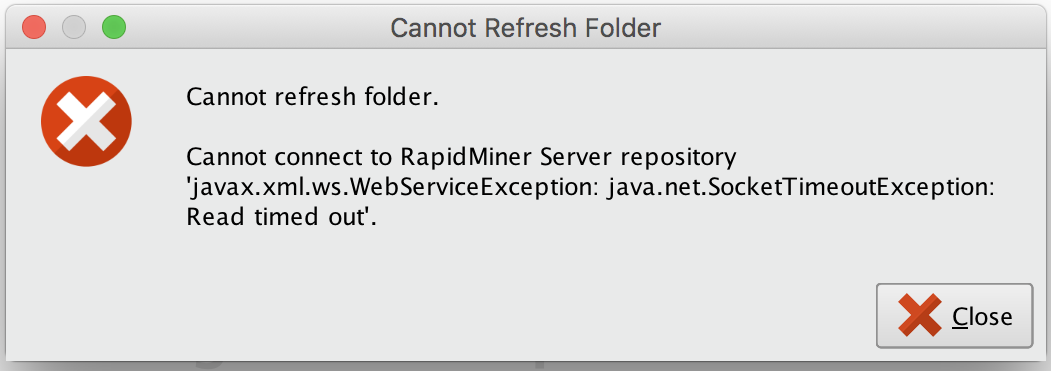
I seem to be running into the "transaction timeout" mentioned in the referenced post, which makes sense to me, as I expect the refresh to take a couple of minutes, considering the folder size.
I searched the docs and the forum, but could not find the right property in the settings to increase the "transaction" time. I am still on RM 7.6, but would expect to also encounter this error in a more recent version, unless the default time has been increased.
Splitting up the folder would not be an ideal solution for me. I would be very grateful, if someone ( @Marco_Boeck ?) could point me in the right direction. Maybe I am just missing something very simple here.
Thank you very much!
Best Answer
-
 Edin_Klapic
Employee-RapidMiner, RMResearcher, Member Posts: 299
Edin_Klapic
Employee-RapidMiner, RMResearcher, Member Posts: 299  RM Data Scientist
Hi @FBT,
the relevant setting should be
Default connection timeout which is located in the System tab of your RapidMiner Studio Settings.The initial value is 20000 ms, i.e. 20 sec.
Best,
Edin
3

Answers
tagging @Edin_Klapic.
Scott
Thank you very much - issue solved! I looked everywhere, just not in the most obvious spot.
is this in the Server docs? https://docs.rapidminer.com/latest/server/administration/server-settings.html
No, it isn't - but probably rightly so. I just wrongly assumed that the timeout message is coming from the server. In fact it is RM Studio that throws the error, if a server pull takes longer then the default connection timeout set in the settings.